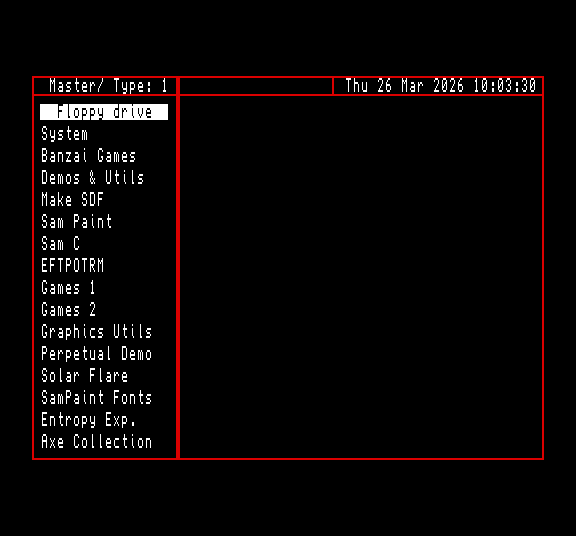
AL B-DOS version 1.5a for ATOM-Lite with CF card.
Confusingly several versions of AL 1.5a exist so they are referred to by the timestamp of the DOS file.
Megaboot version 2.6a (Atom-lite+) Modified by Geoff Winkless 2026
Note: This is a work in progress, not all features are supported yet, shown by (X)
Written by Martijn Groen 2001
Many thanks & credits to Edwin Blink for ideas and help and (a few) comments.
Megaboot AL+was written for use with the new Atom-Lite+ interface. System requirements: B-DOS 1.5a or higher and 256K memory. Processor: Z80B or higher recommended Handy: a DALLAS or SAMBUS-clock
Megaboot detects SAMDOS, MASTERDOS, B-DOS and MS-DOS disks. If a standard MS-DOS disk is detected 'MS-DOS disk' will be displayed (contents aren't displayed!). It is possible to rename a MS-DOS disk using B-DOS (the disk actually has two labels now!). Megaboot will display 'MS-DOS record' if such disk or record is detected (= MS-DOS disk + B-DOS id).
The usual stuff...
Edit key: abandon Megaboot
'F0' key: show last records
'F1' key: show next 16 records
'F4' key: show previous 16 records
'F7' key: show first records
'F2' key: selects Master drive
'F3' key: selects Slave drive
'F5' key: selects Floppy drive
'F6' key: load 'AUTO*' file (on root dir.) from CD-ROM. (X)
SYMBOL O: open CD-ROM drive tray (X)
SYMBOL C: close CD-ROM drive tray (X)
Master or Slave is printed on the top-left of the screen.
'F8' key: run bootable disk. Handy if you want to boot another dos or load a protected game. (X)
'F9' key: load autofile from current record. Autofile can be Basic or code.
Keys 1-7: select dir types and this number is printed after the Master or Slave message.
1: Autorun files: Basic & Code
2: Basic & Auto-Basic files
3: Autorun files & Screens
4: Autorun files & Code
5: Autorun files & Numeric arrays
6: Autorun files & String arrays
7: All (autorun) SAM dir types (Types 1,2,4,5,6 & 7)
In record mode:
Space or Return key: select record and display directory.
Cursor up or down: step through record list.
Cursor right: select record and display directory. Also, enter directory mode. The first file is highlighted, if it exists.
In directory mode:
Space or Return key: load file.
Cursor keys: step through directory.
Cursor left at left boundary: enter record mode.
Use the 'Mega Setup' program to add five or less of your favourite record(s) to the Megaboot program. When you press a key defined in the 'Mega Setup' program, the defined record will be selected and loads the Autofile from that record if it exists. (X)